
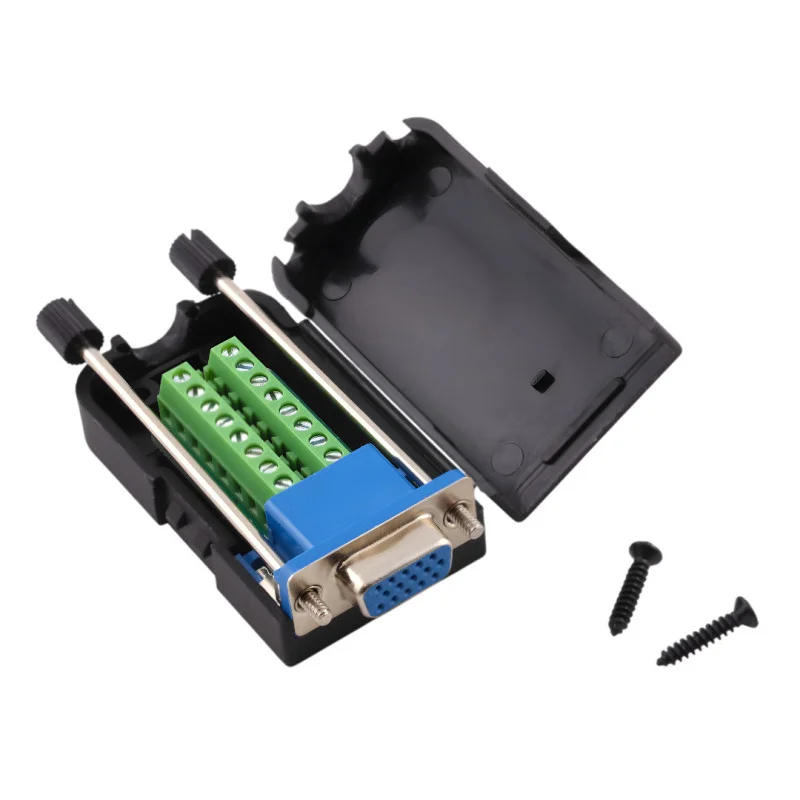
Description
This D-SUB DE15 connector (often incorrectly referred to as DB15/VGA) allows for quick, solderless wire connections using screw terminals. It is suitable for service purposes, prototyping, and wiring conversion to a standard 15-pin female interface with locking nuts.
Technical specifications
Connector type: D-SUB DE15 (HD15), female , 3 rows of contacts
Mechanical locking: integrated nut (screwed to the counterpart)
Dimensions: 76 × 42 × 20 mm
Pitch between pin rows: 2.84 mm
Horizontal pin pitch in a row: 2.77 mm
Material: metal connector + plastic cover (ABS)
Wire connection: screw terminal block (no soldering)
Functions and features
Quick termination of wiring on DE15 using terminals, suitable for repeated wiring
Mechanical protection and cable strain relief in a plastic housing
Screw locking of the connector to the mating piece for a stable connection
Designation: in practice you may encounter the names “DB15”, “VGA”, “Cannon-9” or “Canon9”; the technically correct designation is D-SUB DE15
Ideal for
Service and diagnostic tools with DE15 interface
Prototyping and lab wiring without soldering
Industrial installations where screw-type connector mounting is required
Cabling conversion to D-SUB DE15 in cable harnesses
Package contents
D-SUB DE15 female with terminal block in housing
Why choose this product?
Allows for soldering-free wire connection using a terminal block
Standard D-SUB mechanics with nuts for a firm fit
Combination of metal connector and ABS housing for general technical use
Suitable solution for quick assembly, service and testing
Installation and operating instructions
Before assembly, verify the pin assignment according to your application and device documentation.
Strip the wires appropriately and tighten the terminals so that they do not loosen due to vibration.
After connection, close the cover and check that the wires do not come into contact with the metal part of the connector outside the designated points.
Safety notice
The product is intended for signal connection; before use, verify that the voltage and current ratings are appropriate for your application.
Perform installation with the device power disconnected
Reviews
There are no reviews yet.