
Description
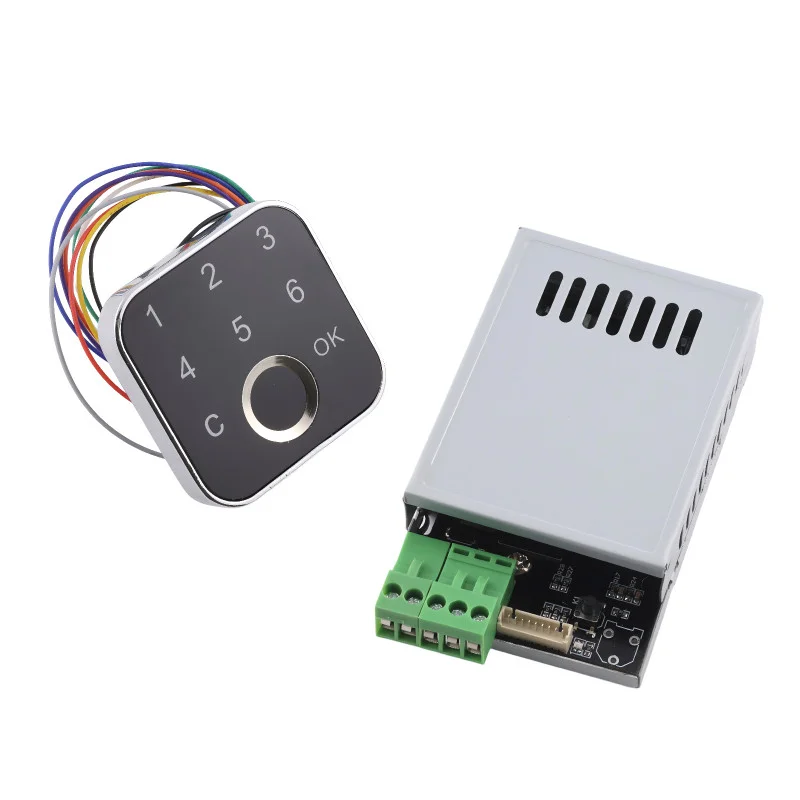
The K226 + G16 kit is an advanced access system combining a control board and an external fingerprint reader. By connecting with the G16, it offers secure and convenient control of electronic locks and other devices. It allows the management of multiple administrators, users and one-time passwords and provides up to four relay control modes. This kit is an ideal choice for installations requiring flexible and reliable security.
Technical specifications
Power supply: DC 10-30V
Standby consumption: 6 mA (at 12 V)
Output: relay (max. current 10 A)
Adjustable relay switching time: 0.5 s – 30 minutes
Fingerprint capacity:
Administrator: up to 40 fingerprints
User: up to 60 fingerprints (2 databases of 30 each)
Password capacity:
Administrator: up to 5 groups
User: up to 5 groups (3-9 digits)
Disposable: up to 5 groups
Control: SET button, fingerprint, password
G16 reader: external fingerprint sensor with LED indication
Functions and features
Combination of biometric identification and password access
Simple user registration directly via the G16 reader
Support for administrator and user accounts
Option for one-time passwords for temporary access
Four relay control modes time, momentary, latching without memory, latching with memory
Possibility to set the relay to switch on for up to 30 minutes
Status indication using LED reader G16
Relay modes
Mode 1 (time): The relay switches on for the set time (0.5 s 30 minutes).
Mode 2 (momentary): The relay remains closed only as long as the finger is applied.
Mode 3 (self-latching without memory): First finger touch relay closes, second touch relay closes. The relay state is not saved after power is disconnected.
Mode 4 (latching with memory): Same as mode 3, but the relay remembers the state even after a power failure.
Ideal for
Electronic door locks
Access systems for homes and businesses
Control of relays and electrical appliances
Security systems requiring a higher level of protection
Package contents
Control board K226
G16 Fingerprint Reader
Connectors for wiring
User manual (EN)
Why choose this set?
Combination of G16 reader and K226 control board for maximum flexibility
Support for multiple administrators, users and one-time passwords
Four relay control modes adaptable to specific applications
Easy installation and intuitive management
Reliable LED signaling for clear operation
Instructions for use
1. First start: Hold down the SET button for 5-6 seconds to restore factory settings.
2. Administrator registration: Short press SET, the blue LED on G16 flashes quickly. Place your finger repeatedly until you hear a musical tone. Up to 40 fingerprints can be stored.
3. User registration: Log in with the administrator fingerprint or password. Select the database (1 or 2) and attach the user’s finger. Each database allows 30 fingerprints.
4. Password settings: The administrator can add up to 5 passwords for both users and administrators (3-9 digits). 5 one-time passwords can also be set.
5. Relay settings: Log in as administrator and select mode (1-4). For time mode, set the switching time (0.5 s – 30 minutes).
6. Usage: Access is possible by placing a registered finger on the G16, entering a password or one-time password.


Reviews
There are no reviews yet.